Catalog Avatar Creator Outfit Codes — How They Work (2026)
How outfit codes work in Catalog Avatar Creator: the 6-character share code format, where to paste a code (Community Outfits), how to publish your own, and where new codes are shared.
Outfit codes are the share codes behind the game's biggest feature: 50M+ community-created outfits that you can browse, load and wear in one tap. Every published outfit gets a code — usually 6 characters, uppercase letters and digits (like 3E1B3A) — and anyone with the code can load that exact look free. This page covers the format, where to paste a code, how to publish your own, and where players share codes.
Quick answer
Quick answer: open Community Outfits (left-side button), use the Outfit Code box at the bottom of the browser (next to the green Publish button), type the code, press Enter — the outfit loads onto your mannequin free. To share your own look: Publish → name it → Generate → copy the code.
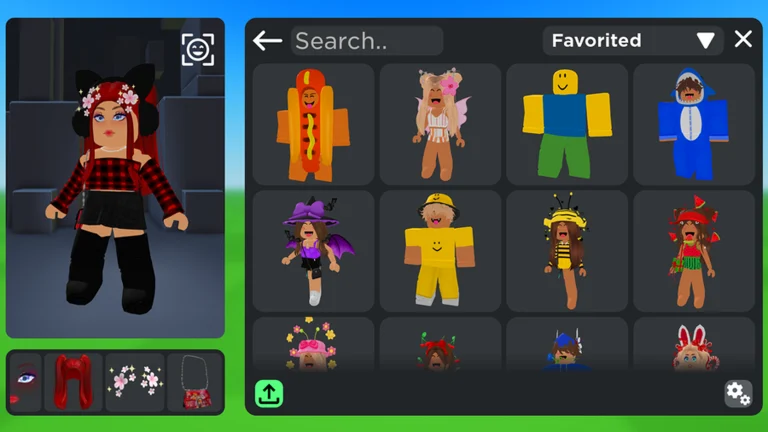
Official in-game image © Muneeb via the Roblox game page.
How to load someone's outfit code
- In-game, click Community Outfits on the left-side button column.
- In the outfit browser, find the Outfit Code input at the bottom bar (left of My Uploads, next to the green Publish button).
- Type the code — copy it exactly as shared — and press Enter. The game shows "Loading outfit", then jumps to that look.
- Preview it on your mannequin and press Wear to keep it on.
From the outfit's detail page you can also see its total cost, Save to Roblox (buy the whole set for your account in one go), and the outfit's own code in the corner.
Seen in footage · 2026-09-22How to publish your own outfit code
- Build your full look in the editor — get every item on before publishing.
- Open Community Outfits, pick a category, and press the green Publish button at the bottom.
- Name your outfit and confirm.
- Press Generate on the Outfit Code prompt and copy the code — that is what you share on Reddit, Discord or with friends.
What the codes look like
Real codes are uppercase hexadecimal strings — digits 0-9 and letters A-F only, no separators — usually 6 characters (a 2021-era outfit's code can be shorter). You will see them posted as plain strings in Reddit titles, Discord channels and video captions. Two cautions:
- Copy codes exactly as shared. Whether the input treats letters case-insensitively has not been verified — pasting the original string is the safe move.
- Watch for fake formats. A fan wiki circulates "codes" with hyphens and underscores (like FAKE-CODE-1) — no real code looks like that. And check the game name: Avatar Outfit Creator is a different experience with a confusingly similar name.
Where players share codes
There is no official code list — the community trades codes in three places:
- Reddit — players post looks with codes in the title or body (r/roblox and hobby subreddits; some creators post dozens at a time).
- The official Discord's #outfit-codes channel — linked from the community hub mentioned on the codes hub.
- YouTube/TikTok/Pinterest captions — outfit showcase posts usually print the code alongside the look.
That gap is why this page explains the mechanism rather than listing codes: codes point to individual players' outfits, and we prefer teaching the flow over vouching for strangers' looks. Browse the in-game Most Popular tab for curated picks instead.
Do outfit codes expire?
Codes are references to published outfits, and they are surprisingly durable: a code from a 2021 outfit was confirmed working nearly three years later. What is not documented anywhere: whether editing a published outfit changes its code (to be verified — even community threads have no answer). If a code suddenly loads nothing, the outfit may have been unpublished or moderated — the items not loading guide covers the display-side fixes.
FAQ
Are outfit codes the same as item IDs?
No — three different systems live in this game's chat and menus: outfit codes (share a whole look), item IDs (numeric Roblox asset numbers for one item), and /redeem codes (promotional rewards, currently none active).
Do I need Robux to use an outfit code?
Loading and previewing is free. The loaded outfit may contain items that cost Robux — the detail page shows the total, and buying is optional (per the official description, purchases land in your Roblox inventory).
Is there an outfit ID too, or just a code?
Each published outfit carries its Outfit Code on the detail page (bottom-right corner) — the shareable part is the code, not a separate numeric ID. If you see an outfit's numeric asset ID somewhere, that identifies the underlying asset, not the look as a whole.
Why does my outfit code say loading forever?
A deleted/unpublished outfit or a server hiccup. Rejoin once, then work through the items not loading checklist — and double-check the code against the original post.
All codes
Related pages